


















On November 24, 2026, Google made the Workspace MCP servers and the official Workspace CLI generally available. From February 1, 2027, AI agents must use one of them instead of calling the Workspace REST APIs directly. On the free Standard tier, the Gmail MCP server allows 5,000 requests per day per project, and one inbox search costs 10 of them.
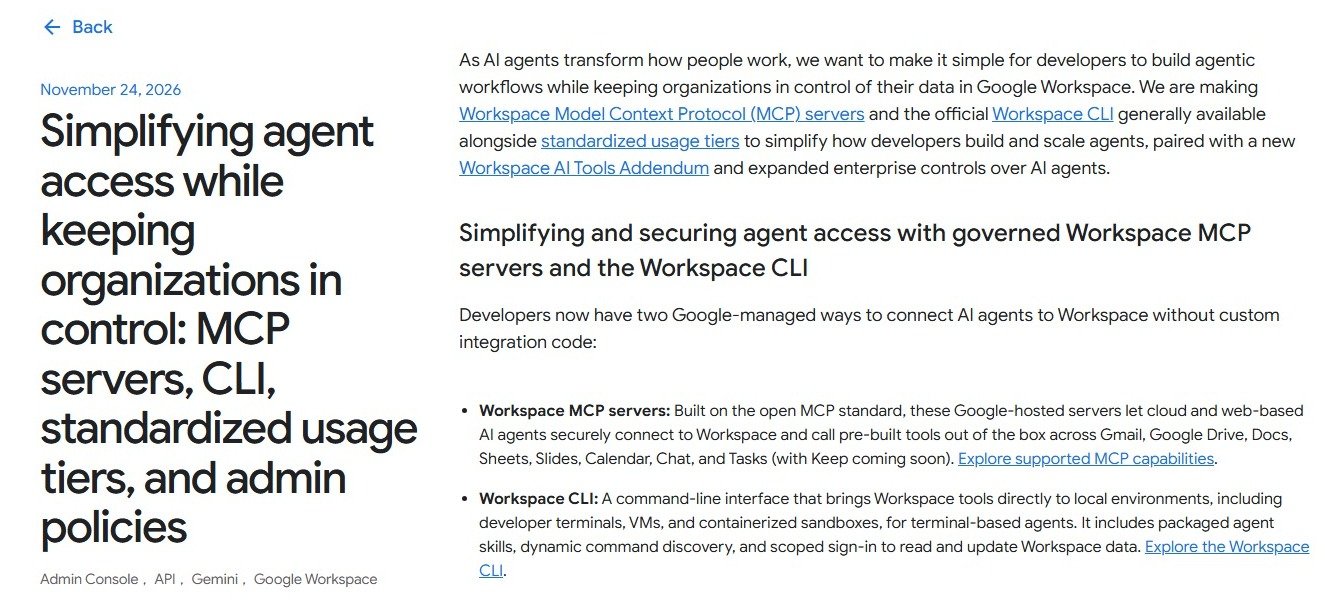
Source: Google Workspace Updates
Read this first. We did not test any of this. Everything in “The facts” comes from four Google pages. The budget formula, the triage example and the checklist are our own math and our own reading. Google says the per-tool costs are static and “subject to change”, so redo the numbers before you rely on them.
The facts
- The rule: “AI agents or similar access tools must use Workspace MCP servers or the Workspace CLI to access Workspace data, rather than calling Workspace REST APIs directly. Technical enforcement begins on February 1, 2027.” (Google Workspace Updates)
- The terms: the AI Tools Addendum says the access tool “must use a Google MCP” when it is or is driven by an AI agent, and you may not obfuscate to get around that (Google Workspace AI Tools Addendum).
- Servers: hosted by Google for Gmail, Drive, Docs, Sheets, Slides, Calendar, Chat and Tasks. Keep is “coming soon” (Google Workspace Updates).
- Tiers: Standard has no cost and published quotas. Scaled has larger quotas and is billed from April 1, 2027. Without action before then, projects fall to Standard limits at no cost (Google Workspace Updates).
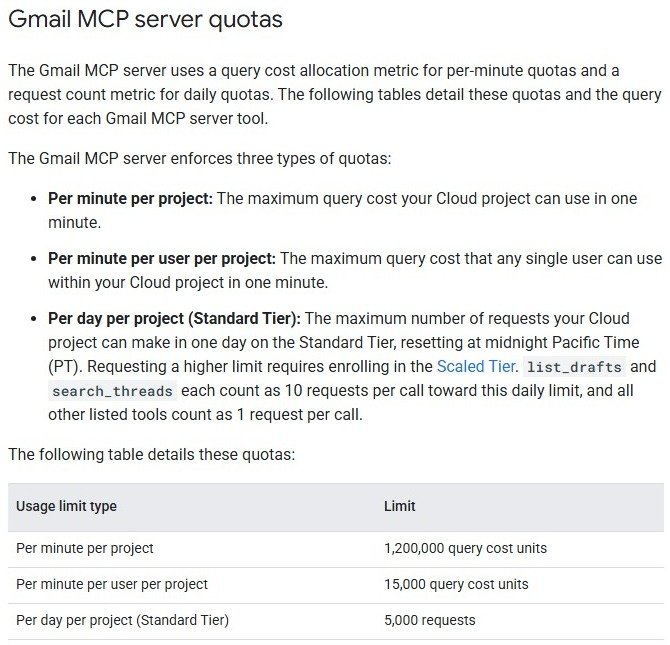
- Gmail MCP, Standard: 5,000 requests per day, per project, per product. Resets at midnight Pacific. Per minute: 1,200,000 cost units per project and 15,000 per user per project (Google quotas page).
- The 10x tools:
search_threadsandlist_draftscount as 10 requests per call “because they make multiple API calls”. Every other tool counts as 1 (Google quotas page). - Who is on Standard: “Over 99% of active developers currently operate within the Standard tier” (Google Workspace Updates).
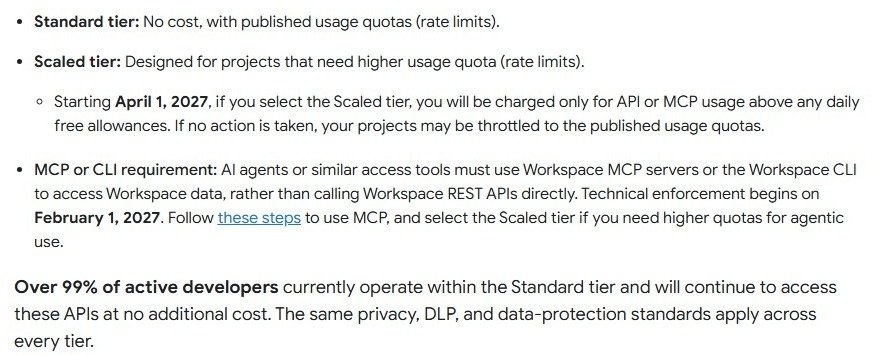
Source: Google Workspace Updates
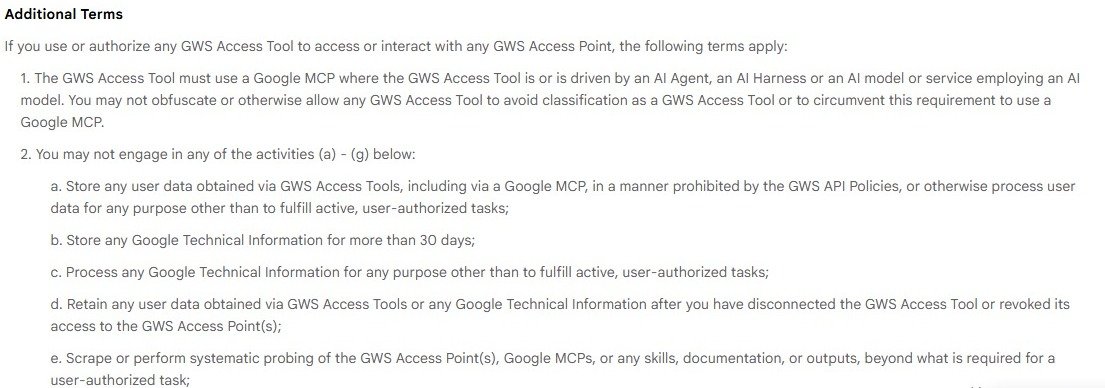
Source: Google Workspace AI Tools Addendum
The daily budget formula (ours)
Daily budget = runs per day x requests per run. Keep it under 5,000 per project.
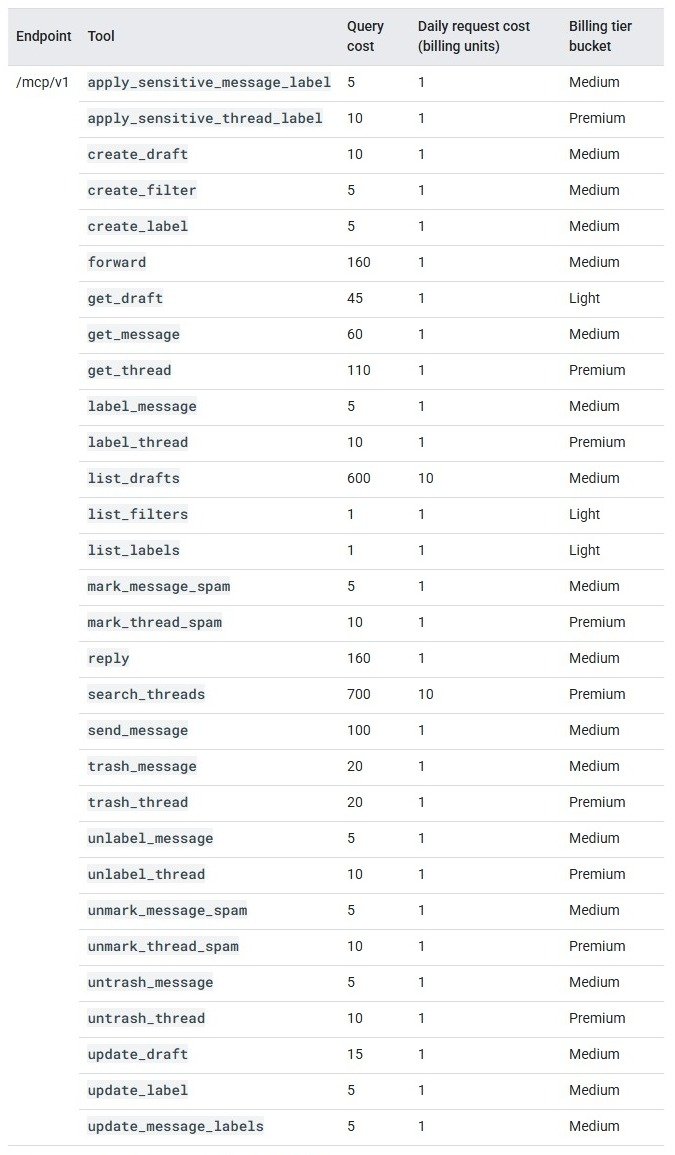
Requests per run is the sum of the daily cost of each tool call. Here is Google’s table, shortened (the page lists more tools, such as filters, spam and untrash, at 1 to 10 per minute and 1 request a day), with the per-minute cost too:
| Tool | Daily cost | Per-minute cost |
|---|---|---|
| search_threads | 10 | 700 |
| list_drafts | 10 | 600 |
| forward | 1 | 160 |
| reply | 1 | 160 |
| get_thread | 1 | 110 |
| send_message | 1 | 100 |
| get_message | 1 | 60 |
| get_draft | 1 | 45 |
| trash_message, trash_thread | 1 | 20 |
| update_draft | 1 | 15 |
| create_draft | 1 | 10 |
| label tools (label_*, unlabel_*, create_label, update_label, update_message_labels) | 1 | 5 to 10 |
| list_labels | 1 | 1 |
Source: Google for Developers
Source: Google for Developers
Failed calls that return isError:true are not billed, but they still count toward the 5,000 a day and toward the per-minute limits (Google quotas page).
Example: an inbox triage agent
Our example run: 1 search_threads (10), 5 get_thread (5), 5 label calls (5). That is 20 requests per run.
- Every 15 minutes: 96 runs x 20 = 1,920 a day. Fine.
- Every 5 minutes: 288 runs x 20 = 5,760 a day. Over the limit.
At 20 per run, the ceiling is 250 runs a day. If the agent does nothing but search, the ceiling is 500 searches a day (5,000 / 10).
Trap 1: the 5,000 is per project, not per user
If you build an app and put 100 users in one Standard project, each user gets about 50 requests a day on average (our math). That is two and a half of the runs above. For a multi-user app, this is the number that decides your design.
Trap 2: the per-minute limit per user
15,000 per user per minute, divided by 700 for a search, is about 21 searches a minute for one account (our math). A loop that searches in a burst will hit this long before the daily cap.
Migration checklist before February 1
- Make a separate OAuth client for the agent. Tick “Use this client for an AI-powered agent”. If your existing client also does non-agent work, create a new client for the agent. Google says traditional features should use a separate one.
- Enable the Gmail MCP API. The endpoint is
https://gmailmcp.googleapis.com/mcp/v1. Google’s command isgcloud services enable gmailmcp.googleapis.com. - Check quotas in the right place. Cloud console > APIs & Services > Gmail MCP API > Quotas & System Limits. The Workspace dashboard does not show the 5,000 MCP limit.
- Cut the 10x calls. Cache search results and group searches. Before you cache, read the addendum: it bars keeping “Google Technical Information” for more than 30 days. We did not check whether that covers your data, so ask before you build a store.
- Count your failures. Retries on errors still use quota.
- Decide Standard or Scaled before April 1. Scaled bills from the first request of the Gmail MCP server, with no daily allowance (Google quotas page). We did not read the Scaled prices, so check them yourself.
- If you run Workspace, look at the admin side. Admin console > Security > API Controls covers external AI tools, human confirmation rules and the audit log of agents.
Google says the rollout reaches everyone “in 2 weeks” from the announcement, so the options may not be visible in your account yet.
What it changes
For app developers: the 5,000 is per project. Budget per user, not per project, and watch the per-minute limit. Moving to Scaled is a business decision, so make it before April 1.
For solo founders: an agent that triages your own inbox every 15 minutes fits inside Standard with room to spare. Going to every 5 minutes does not. Poll less often, or search once and read many.
For anyone who already delegates work to agents: your agent now has a daily budget and a rulebook set by the platform. Treat the 5,000 like a salary line, and log what each run costs.
For game developers and gamers: nothing changes directly. We found nothing about games in these pages.
What we cannot say: the Gmail tool table lists send_message, reply and forward. The fallback endpoint /mcp/v1self leaves out tools that always need interactive approval. We did not test sending, so we do not say it works or that it does not.
Who can ignore it: anyone whose agent never touches Gmail, Drive, Calendar or the other Workspace products. REST access is not described by Google as switched off, but the rule says agents must use MCP or the CLI from February 1.
Sources
- Google Workspace Updates, “Simplifying agent access while keeping organizations in control”, Nov 24, 2026: https://workspaceupdates.googleblog.com/2026/11/mcp-servers-cli-standardized-usage-tiers-now-available.html
- Google for Developers, “Gmail API and MCP server quotas”: https://developers.google.com/workspace/gmail/api/guides/quotas
- Google Workspace AI Tools Addendum, last modified Nov 24, 2026: https://workspace.google.com/terms/ai-tools
- Google for Developers, “Configure the Google Workspace MCP servers”: https://developers.google.com/workspace/guides/configure-mcp-servers
- The budget formula, the triage example, the 100-user and per-minute calculations and the checklist order are ours and untested. Screenshots are from the Google pages.