


















On November 20, Thinking Machines Lab released Inkling 2 Mini, an open-weights model (Apache 2.0) with 26.4B total parameters and 3.4B active per token. According to Thinking Machines, it leads every open-weights model with less than 100B total parameters on benchmarks such as DeepSWE v1.1 (48.2%) and Vals Index v2.2 (46.5%). It also passed 1,000 points on Hacker News within a day.

The pitch is a model small enough to run on your own machine, so a coding agent does not bill you per token. This post is the practical side: how the trick works, what the numbers do and do not say, and a 3-minute check to see whether your hardware can handle it before you download 20GB.
How looping works, in plain words
Inkling 2 Mini has 24 layers, split into 4 blocks of 6. The first and last blocks run once. The two middle blocks run three times each. That gives 48 layer applications per token, from only 24 stored layers.
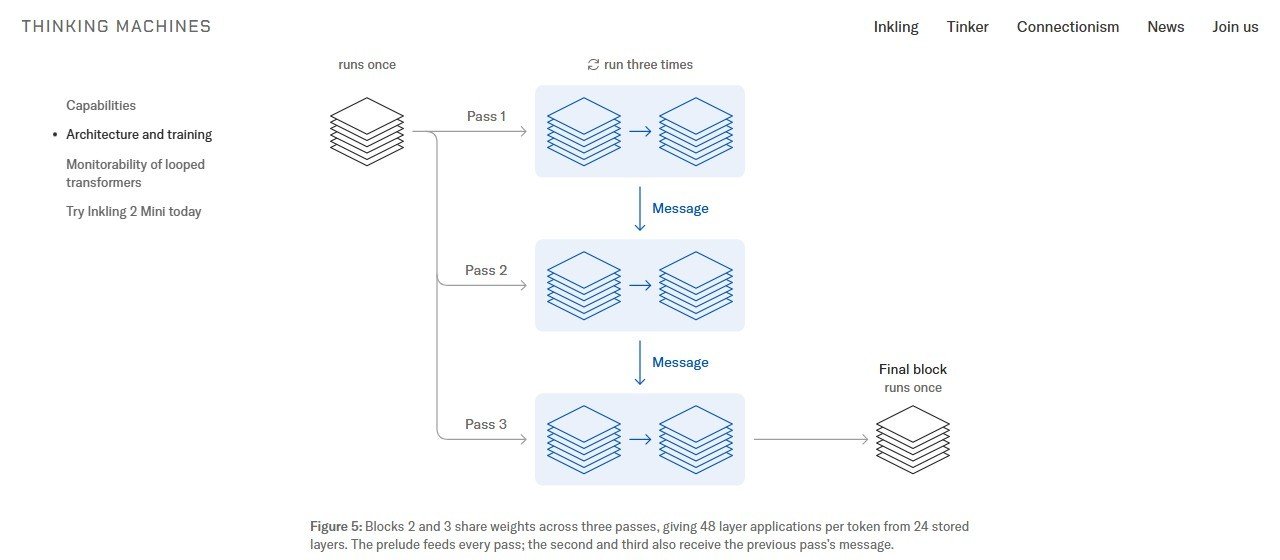
Why the middle? Thinking Machines tested it. Looping layers 7 to 18 gave more gain than looping the last layers (13 to 24) in 27 of 28 evaluations. In compute-equivalent terms, the middle loop was worth 1.51x to 1.91x, against 1.24x to 1.36x for the end loop.
The trade-off, in one sentence: you store a small model but make it think like a bigger one. According to Thinking Machines, a model without the loop was 7.5% cheaper to train, but needed 140% more inference compute to reach the same loss on 512k-token agent traces. Training costs a bit more, and running costs much less. For you, the person running it, running is the part that matters.
Each extra pass adds about 1.0B effective active parameters. With three passes, that is the 5.4B “weight activations per token” the company quotes.
The numbers, and what they don’t say
These are Thinking Machines’ own numbers, and the company states that evaluation setups vary by model. Treat them as a starting point, not a leaderboard.
Scores below are tasks resolved, according to Thinking Machines (Q = Qwen3.8-27B, G = Gemma 4 31B):
| Benchmark | Inkling | Q | G |
|---|---|---|---|
| DeepSWE v1.1 | 48.2% | 42.2% | 0.3% |
| SWE-bench Pro v2 Hard | 77.9% | 73.8% | 14.2% |
| SWE-bench Verified | 79.2% | 77.8% | 46.1% |
| Terminal Bench v2.1 | 71.6% | 73.0% | 43.4% |
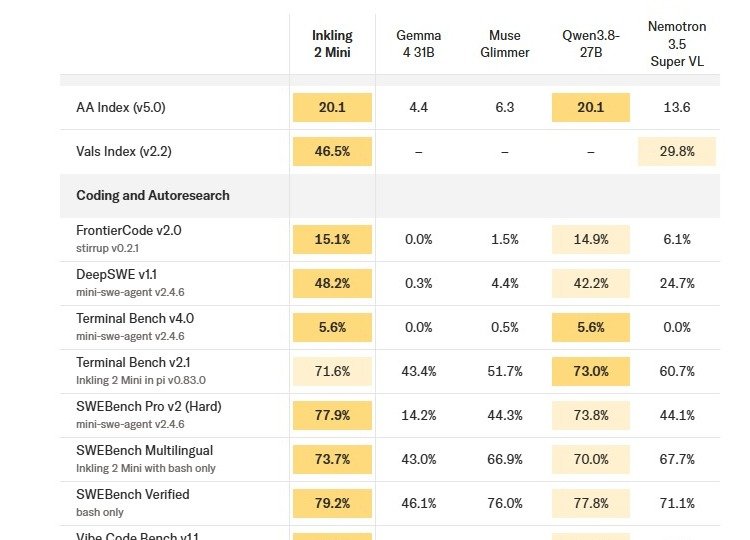
Qwen3.8-27B wins Terminal Bench v2.1. And the gaps on SWE-bench Verified are small (79.2% against 77.8%), so do not read that row as a landslide.
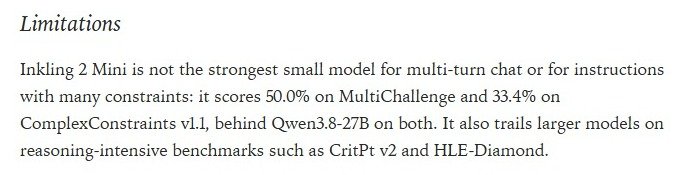
The company also lists its own weak spots. Inkling 2 Mini scores 50.0% on MultiChallenge and 33.4% on ComplexConstraints v1.1, behind Qwen3.8-27B on both. It trails larger models on CritPt v2 and HLE-Diamond. And looping does not store more facts: knowledge depends on total parameters. Thinking Machines says to compensate with search and tools.
Practical reading: if you use it as a coding agent, give it web search and your docs. Do not use it as an encyclopedia.
Will it run on your machine? A 3-minute pre-flight
The model card lists a single checkpoint of about 20GB, supported on one NVIDIA DGX Spark or Apple silicon with 32GB or more. For other GPUs, “32GB or more of VRAM recommended.”
| Your hardware | What to do |
|---|---|
| Mac with Apple silicon, 32GB+ | Official path. Ollama or MLX. Thinking Machines ran it offline on a MacBook Pro (M5 Pro, 48GB). |
| GPU with 32GB+ VRAM | Meets the official recommendation. Ollama or the GGUF with llama.cpp. |
| NVIDIA DGX Spark | Officially supported. |
| Anything smaller | Below the recommendation. Test before you plan work around it, or use Tinker (hosted). |
Real file sizes: the Ollama build is 20GB. The GGUF files on Hugging Face are IQ4_NL at 17.63GB, Q8_0 at 27.82GB and BF16 at 52.23GB.
Here is the script we wrote to check a machine. It uses only the Python standard library and is written for Windows, macOS and Linux, but we only ran it on Windows. The macOS and Linux branches are untested. The thresholds come from the model card, except the 5GB disk margin, which is ours.
"""Can this machine run Inkling 2 Mini locally? A quick pre-flight check.

Thresholds come from the official model card (huggingface.co/thinkingmachines/Inkling-2-Mini):
  - single checkpoint of about 20 GB
  - Apple silicon with 32 GB or more memory
  - other GPUs: 32 GB or more of VRAM recommended
Standard library only. Written for Windows, macOS and Linux; tested on Windows only.
"""
import platform
import shutil
import subprocess

CHECKPOINT_GB = 20
MIN_MEMORY_GB = 32


def total_ram_gb():
    system = platform.system()
    try:
        if system == "Windows":
            import ctypes

            class MEMSTATUS(ctypes.Structure):
                _fields_ = [("dwLength", ctypes.c_ulong), ("dwMemoryLoad", ctypes.c_ulong),
                            ("ullTotalPhys", ctypes.c_ulonglong), ("ullAvailPhys", ctypes.c_ulonglong),
                            ("ullTotalPageFile", ctypes.c_ulonglong), ("ullAvailPageFile", ctypes.c_ulonglong),
                            ("ullTotalVirtual", ctypes.c_ulonglong), ("ullAvailVirtual", ctypes.c_ulonglong),
                            ("ullAvailExtendedVirtual", ctypes.c_ulonglong)]
            s = MEMSTATUS()
            s.dwLength = ctypes.sizeof(MEMSTATUS)
            ctypes.windll.kernel32.GlobalMemoryStatusEx(ctypes.byref(s))
            return s.ullTotalPhys / 1024**3
        if system == "Darwin":
            out = subprocess.run(["sysctl", "-n", "hw.memsize"], capture_output=True, text=True).stdout
            return int(out) / 1024**3
        with open("/proc/meminfo") as f:
            return int(f.readline().split()[1]) / 1024**2
    except Exception:
        return None


def nvidia_vram_gb():
    if not shutil.which("nvidia-smi"):
        return None
    out = subprocess.run(["nvidia-smi", "--query-gpu=name,memory.total", "--format=csv,noheader,nounits"],
                         capture_output=True, text=True).stdout.strip()
    if not out:
        return None
    name, mib = out.splitlines()[0].rsplit(",", 1)
    return name.strip(), int(mib) / 1024


def tool_version(cmd):
    if not shutil.which(cmd[0]):
        return None
    r = subprocess.run(cmd, capture_output=True, text=True)
    return (r.stdout or r.stderr).strip().splitlines()[0]


def main():
    ram = total_ram_gb()
    gpu = nvidia_vram_gb()
    free = shutil.disk_usage(".").free / 1024**3
    apple = platform.system() == "Darwin" and platform.machine() == "arm64"

    print(f"OS:          {platform.system()} {platform.machine()}")
    print(f"RAM:         {ram:.0f} GB" if ram else "RAM:         unknown")
    print(f"NVIDIA GPU:  {gpu[0]}, {gpu[1]:.0f} GB VRAM" if gpu else "NVIDIA GPU:  none found")
    print(f"Free disk:   {free:.0f} GB (checkpoint is about {CHECKPOINT_GB} GB)")
    print(f"Ollama:      {tool_version(['ollama', '--version']) or 'not installed'}")
    print()

    if free < CHECKPOINT_GB + 5:
        print("VERDICT: free up disk first. The download alone is about 20 GB.")
    elif apple and ram and ram >= MIN_MEMORY_GB:
        print("VERDICT: supported path. Apple silicon with 32 GB+ is on the official list (Ollama, MLX).")
    elif gpu and gpu[1] >= MIN_MEMORY_GB:
        print("VERDICT: supported path. Your GPU meets the 32 GB VRAM recommendation.")
    elif gpu:
        print(f"VERDICT: below the official recommendation ({gpu[1]:.0f} GB VRAM vs 32 GB).")
        print("         Even the 4-bit GGUF (IQ4_NL, 17.6 GB) is bigger than your VRAM, so most")
        print("         layers would sit in system RAM. Test speed before you plan work around it,")
        print("         or use the hosted option (Tinker).")
    else:
        print("VERDICT: no supported accelerator found. Try the hosted option (Tinker) instead.")


if __name__ == "__main__":
    main()
Save it as preflight.py and run python preflight.py. This is the real output on the AI Mind Center PC (Windows 11, RTX 4060 with 8GB VRAM, 63GB RAM):
OS:          Windows AMD64
RAM:         63 GB
NVIDIA GPU:  NVIDIA GeForce RTX 4060, 8 GB VRAM
Free disk:   49 GB (checkpoint is about 20 GB)
Ollama:      ollama version is 0.40.16

VERDICT: below the official recommendation (8 GB VRAM vs 32 GB).
         Even the 4-bit GGUF (IQ4_NL, 17.6 GB) is bigger than your VRAM, so most
         layers would sit in system RAM. Test speed before you plan work around it,
         or use the hosted option (Tinker).
Our machine has plenty of system RAM but only 8GB of VRAM, so it lands below the official recommendation. The script does not say “it will not work”. It says the model would likely spill into system RAM, which we did not test, and you should measure speed before depending on it.
The error we hit first
On that machine we ran ollama pull inkling-2-mini and it failed in one second:
Error: pull model manifest: 412: The model you are attempting to pull requires a newer version of Ollama.We were on Ollama 0.40.16. The fix is to update Ollama before you pull.
To be clear about what we did and did not do: we did not update Ollama and we did not run the model. We have no speed or quality measurements of our own. Everything about the model’s behavior in this post comes from Thinking Machines, Hugging Face and Ollama.
Three ways to run it
- Ollama. After updating Ollama:
ollama run inkling-2-miniThe Ollama page lists 20GB, 1M context, and text and image input.
- llama.cpp, from the Hugging Face blog. The 4-bit GGUF:
llama serve -hf ggml-org/Inkling-2-Mini-GGUF:IQ4_NLUse :Q8_0 instead of :IQ4_NL for the 8-bit file (27.82GB). The same blog says the Llama App (macOS and Windows) gives you a local OpenAI-compatible API for agents and editors.
- Tinker, hosted. Thinking Machines offers Inkling 2 Mini for inference and fine-tuning on Tinker, and for chat on the Tinker Playground. This is the route if your hardware is below the recommendation.
Plugging it into a coding agent
The Ollama page lists these launch commands:
ollama launch claude --model inkling-2-mini
ollama launch opencode --model inkling-2-mini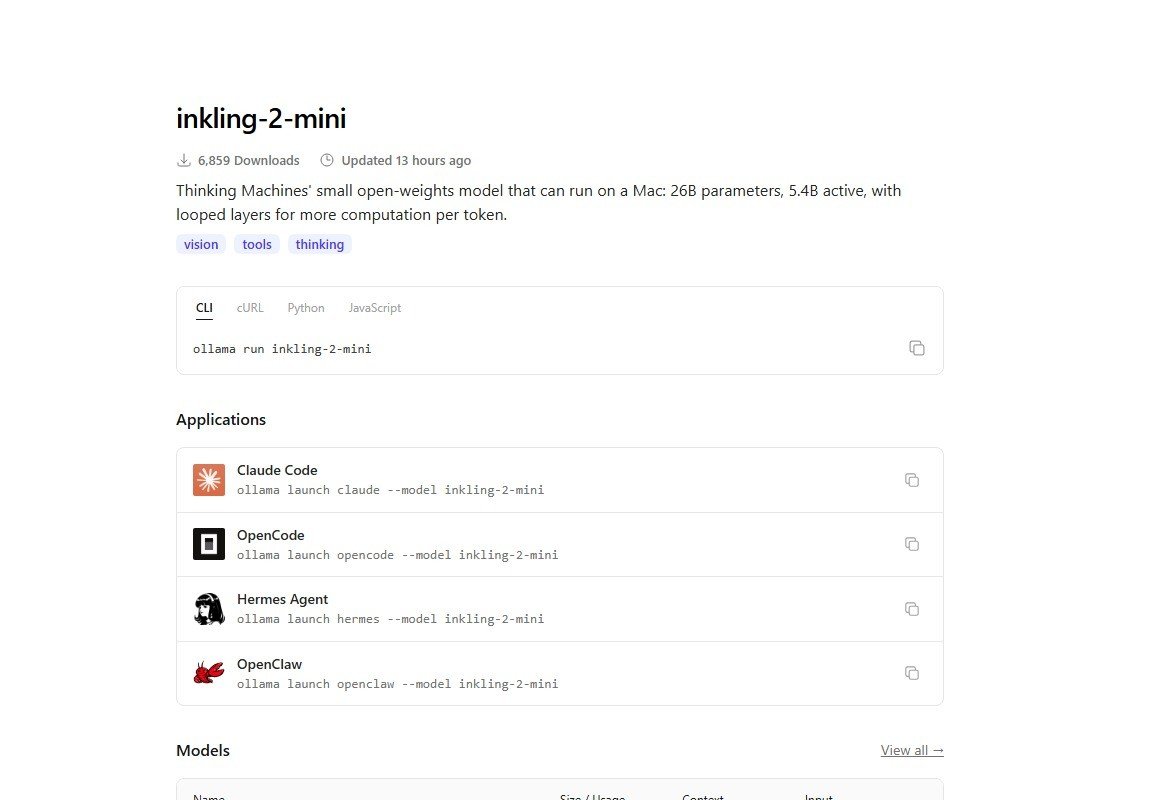
They come from the Ollama page, and we did not test them. The page also lists Hermes Agent and OpenClaw.
When to pick it, when not to
Pick it if:
- You have an Apple silicon Mac with 32GB or more, a 32GB VRAM GPU or a DGX Spark, and you want an open coding agent without per-token billing.
- You want Apache 2.0 weights you can keep and fine-tune.
- Your work is agentic coding and you can give the model search and tools.
Skip it, or use Tinker, if:
- Your GPU has 8GB of VRAM like ours. Measure before committing.
- You need strict instruction following or long multi-turn chats. Thinking Machines itself shows it behind Qwen3.8-27B on MultiChallenge and ComplexConstraints.
- You want it to answer factual questions from memory.
Sources
- Thinking Machines Lab, “Introducing Inkling 2 Mini” (Nov 20, 2026): https://thinkingmachines.ai/news/inkling-2-mini/
- Model card, Hugging Face: https://huggingface.co/thinkingmachines/Inkling-2-Mini
- Hugging Face blog: https://huggingface.co/blog/inkling2mini
- Ollama library: https://ollama.com/library/inkling-2-mini
- Hacker News discussion: https://news.ycombinator.com/item?id=50581260
- GGUF sizes: Hugging Face, ggml-org/Inkling-2-Mini-GGUF: https://huggingface.co/ggml-org/Inkling-2-Mini-GGUF
- Our test: AI Mind Center, November 21, 2026 (script and output above)